SAP: Using BREAK-POINT ID
I sometimes come across standard code that looks like it may make my life easier, but I'm not sure how.
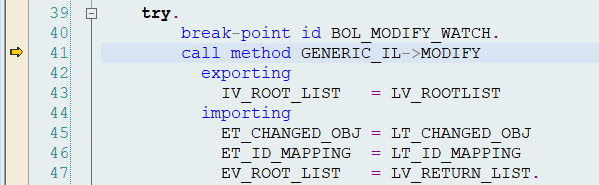
BREAK-POINT ID <...> is a statement like that:
I sometimes come across standard code that looks like it may make my life easier, but I'm not sure how.
BREAK-POINT ID <...> is a statement like that:
If you want to remove messages from a CRM order and you want the message to be removed at the database level (not only at the UI level), for instance, to be able to remove errors that prevent you from creating a follow-up document (follow-up documents can only be created from error-free documents), you may find the following code snippet useful:
Note that the following is using function modules because the BOL layer does not provide the appropriate method calls:
In WebUI, say you have a search attribute OBJECT_ID that is labelled "Object ID" on the UI search screen. How do you retrieve that label "Object ID" at runtime (i.e. to output an error message for mandatory field check)?
Simply call
me->get_possible_fields( ).
inside the implementation class methods (i.e. DO_PREPARE_OUTPUT etc.)
BTW, in all other contexts, to get the text representation of a technical field (say you are reading field communication type, and the technical value (result of get_property_as_string()) is TEL) simply call
I've recently faced the requirement to retrieve the BP in the manager role (head) of an orgs parent org. In CRM, you can use function module RH_STRUC_GET to do just that: Supply it with a starting point (BP, central person, position or org unit) and it will do its work according to the evaluation path given.
First off, attachments are completely independent from the rest of the transaction. As soon as you add the attachment, it's saved on the DB - no need to save the transaction.
If you're looking for standard source code how to add attachments to an object, set a breakpoint in CL_CRM_DOCUMENTS=>CREATE_WITH_TABLE and upload an attachment. (CL_CRM_BSP_CM_CONTROL=>CREATE_DOCUMENT contains some useful methods to fill the parameters.)
Once the attachment is saved, you can find it in the following tables:
I'm a friend of keeping my SAP systems tidy and avoiding the need of "expert knowledge" on how certain system functionality works, especially which transactions or tables are involved.
An ideal way of killing those 3 birds with 1 stone is the extension of the IMG (or SAP Customizing or IMG).
It allows you to:
belonging to a functionality.
When you debug the function modules that read the org structure you quickly notice that no DB access takes place. This is because the org data is stored in an internal buffer (cluster table).
So whenever you changed the org structure, make sure you run report HRBCI_ATTRIBUTES_BUFFER_UPDATE to refresh the buffer.
Org structure attributes are stored in tables HRP1222 and HRT1222.
Simply fill HRP1222-OBJID with the ORG Unit ID and execute. From the result, take the content of field HRP1222-TABNR and use it to select from table HRT1222 (key field is TABNR).
In my previous post I complained about people not using the message statement to output error messages. But sometimes Where-used does indeed fail because it is not up-to-date.
A little known transaction (at least I hardly read about it) comes to help: CODE_SCANNER.
It allows you to input a package and a search string and will find you all lines of code that contain that string.
Imagine you see an error message in WebUI or in some other interface. You manage to identify the message class and number, go to SE91, do a Where-used and find - nothing. The reason is that either Where-used was not updated correctly or (most likely) somebody did not both to use the message command to output the message but just hardcoded the message ID, number and type.