Standard BOs
Suppose you want to create a link that directly opens e.g. opportunity 4711. SAP explains how to create such a deep-link here: Predetermining URLs for Direct Navigation | SAP Help Portal. Note that, for unknown reasons, they URL-encoded their examples. So if you're not familiar with this, simply replace %5B with [ and %5D with ].
The basic example boils down to
https://my<TenantID>.crm.ondemand.com/sap/public/byd/runtime?bo_ns=http://sap.com/thingTypes&bo=COD_GENERIC&node=Root&operation=OnExtInspect¶m.InternalID=<InternalID>¶m.Type=<ThingType>
Simply replace <TenantID> with your tenant's ID, <InternalID> with your opportunity ID (e.g. 4911) and <ThingType> with the technical name from above link (here: COD_OPPORTUNITY_THINGTYPE).
To reuse the above example, assuming your tenant ID is 123456: https://my123456.crm.ondemand.com/sap/public/byd/runtime?bo_ns=http://sap.com/thingTypes&bo=COD_GENERIC&node=Root&operation=OnExtInspect¶m.InternalID=4711¶m.Type=COD_OPPORTUNITY_THINGTYPE
And if you're using SSO, you need to add &OBNRedirect=X to your SSO URL:
https://my123456-sso.crm.ondemand.com/sap/public/byd/runtime?bo_ns=http://sap.com/thingTypes&bo=COD_GENERIC&node=Root&operation=OnExtInspect¶m.InternalID=4711¶m.Type=COD_OPPORTUNITY_THINGTYPE&OBNRedirect=X
Custom BOs
But what about custom BO? They essentially follow the same pattern, you just need the ThingType and the InternalID. SAP has even released note 3088436 - How to Format Predetermined URLs for Custom Business Objects - SAP for Me, which is rather confusing.
The InternalID shouldn't be a problem, it's the AlternativeKey you have defined when creating the Custom BO.
To find the ThingType, you simply have to open the TI (Thing Inspector) component in the UI Designer, go to the tab Controller, Look for the "Inspect" Inport (which is created automatically in generated TIs) and copy the ThingType:
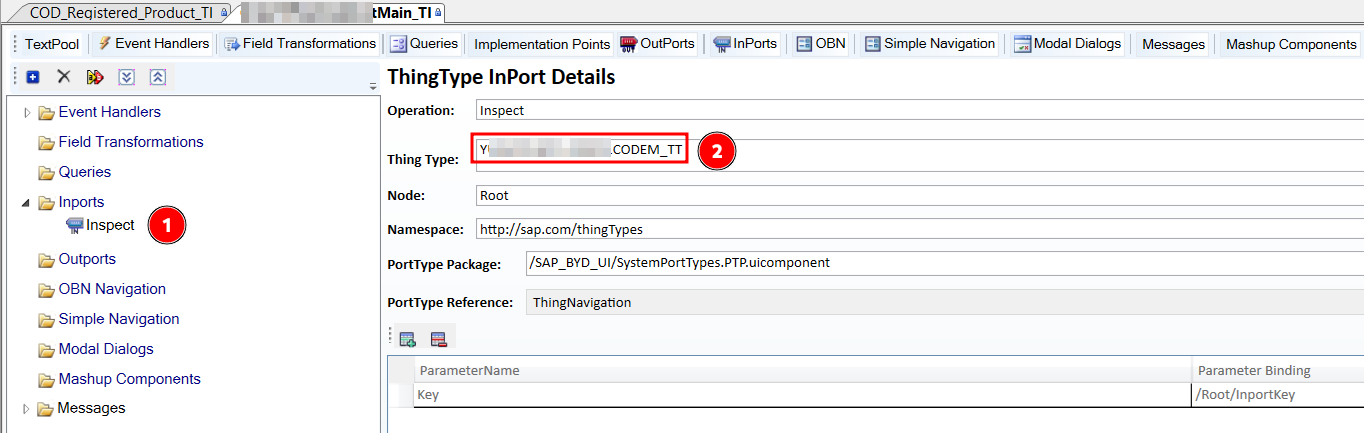
In this example, assume your tenant ID is again 123456, the ThingType from the above screenshot reads Y123CODEM_TT and the AlternativeKey of your targetobject 0815, then your target URL would be:
https://my123456.crm.ondemand.com/sap/public/byd/runtime?bo_ns=http://sap.com/thingTypes&bo=COD_GENERIC&node=Root&operation=OnExtInspect¶m.InternalID=0815¶m.Type=Y123CODEM_TT
Note: You can use the same approach for Standard BOs as well in case the BO isn't listed on SAP's list. Just note that the Inport is sometimes labelled differently. Here's how the Registered Product looks, for example:
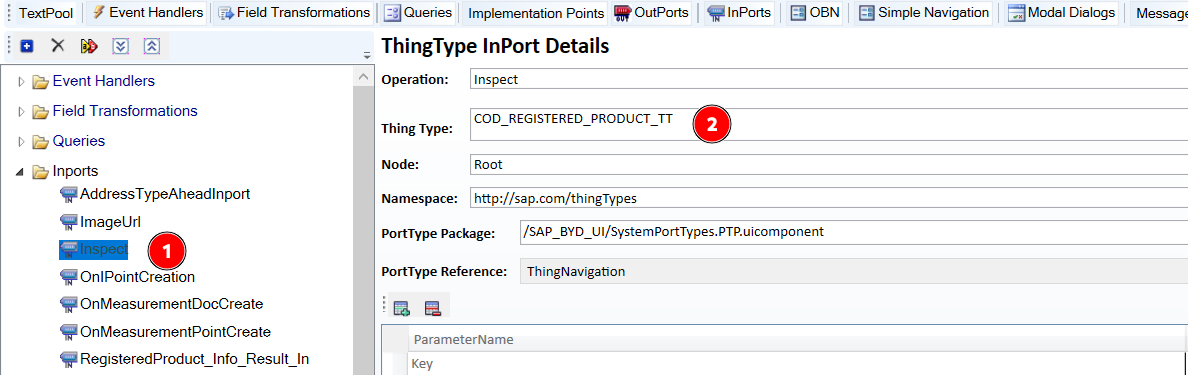
Reports
If you don't want to use PDI, you can also consider a third option: Use reporting/analytics to expose the required data.
Assuming that you have your report set up, you can follow this SAP article: Configure URL Mashup for Third-Party Systems | SAP Help Portal to expose your report via deep-linking.
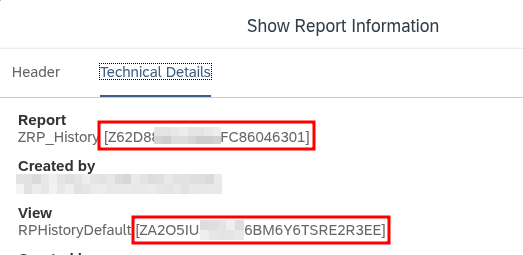
The major with the deeplink is that it doesn't use the Report and View "names" but the IDs. For example, if your report name is ZRP_History and your default view is RPHistoryDefault, you can't use these values directly.

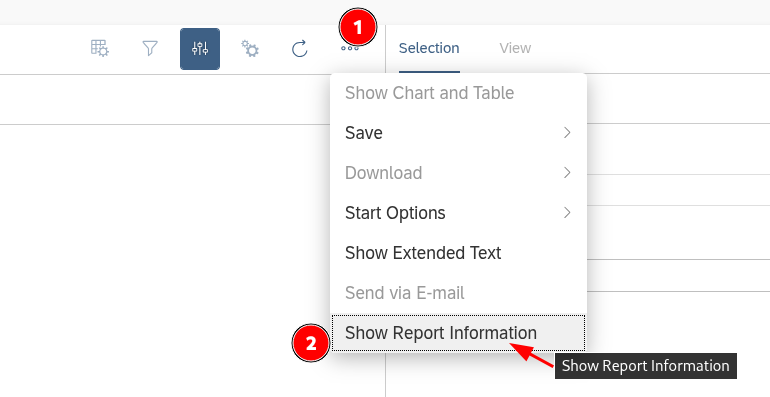
Instead, you have to open the report information:
And then copy the IDs in brackets:
To pass along your opportunity ID (which is optional!), you need to, again, pass the technical ID of the selection parameter. You can find this in the report as well by clicking "Show Technical ID" and copying the PAR_SEL_ value: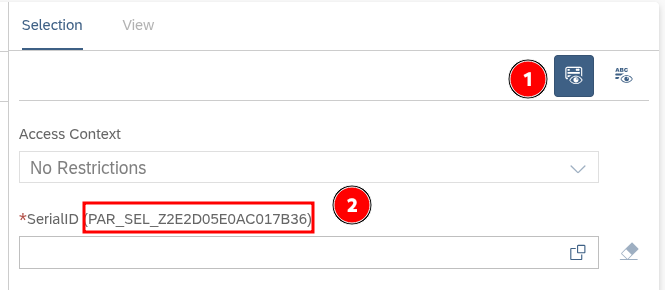
Assuming your tenant ID is 123456, your Report ID is Z62, your View is ZA2, your selection parameter is PAR_SEL_Z2E2D05E0AC017B36 and you're filtering for value 456, you full URL would be:
https://my123456.crm.ondemand.com/sap/public/ap/ui/repository/SAP_UI/HTML5/client.html?app.component=/SAP_BYD_TF/Analytics/AnalysisPattern/ANA_AP_Standalone.QA.uicomponent&app.inport=AnalysisPattern¶m.ReportId=Z62¶m.ReportType=RP¶m.SelectedViewId=ZA2¶m.Scenario=AP¶m.Selection.PAR_SEL_Z2E2D05E0AC017B36='456'
You can find more info regarding those selects and how to filter for multiple values etc. in the following ByD article: Launch SAP Business ByDesign Reports using Paramet... - SAP Community
Disclaimer: I haven't gotten the part that filters for the value to work yet, so I'm not sure if this is only supported in ByD.